


CrimeRadar: Dispatch Alerts
4.86.57K Reviews
App Specs
- Version
- 26.42.1
- Updated On
- License
- Free
- Downloads
- 1,000,000+
- Developer
- Scoopz LLC
- Categories
- News & Magazines
- Platform
- Android, iOS
Screenshots
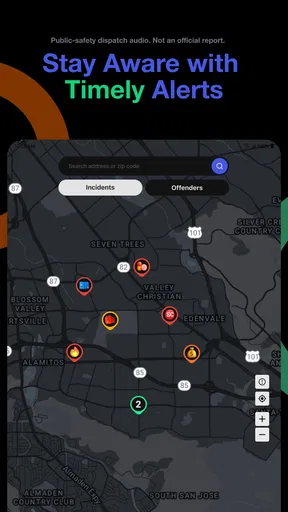
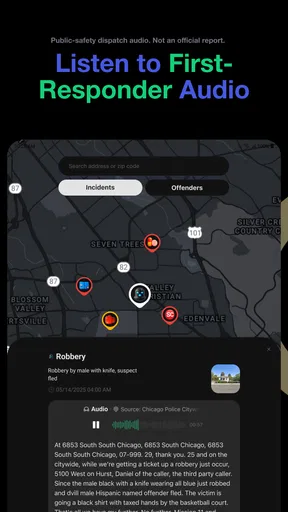
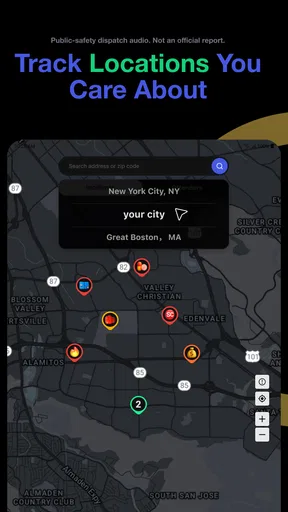
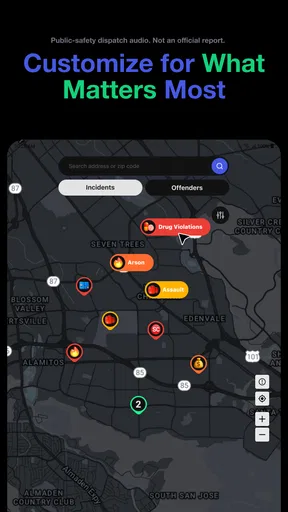
 Analysis by AppCompare
I think the best way to judge a neighborhood-safety app is to start with a real question: what would I do differently after opening it? A map can catch my eye, but it is only useful if it helps me make a calm, practical decision rather than turning every marker into a reason to worry. CrimeRadar is built around that kind of awareness, combining a safety map with alerts connected to live first-responder radio. That focus makes it distinct from a general news feed, though it also calls for a little care in how I interpret what I see.
From a quick check to a sensible plan
My most useful imagined routine is ordinary: I’m about to walk to a transit stop after dark, or I’m choosing between two routes home. I would open the map, look at the area I’m actually crossing, and use the view as one piece of context—not as a verdict on whether a street is safe. If an alert catches my attention, I’d pause and check whether it affects my route or timing before changing plans. That distinction matters: incident information can prompt awareness, but it cannot predict what will happen next.
A practical habit is to check the map before leaving rather than repeatedly refreshing it during a walk. That keeps the app in the role of a planning aid and leaves attention on the surroundings. I would also avoid treating a cluster of markers as a direct comparison between neighborhoods unless I know what time period and reporting context I’m looking at. A map can make activity feel more concentrated simply because it presents information visually.
Useful for local context, not a safety guarantee
This is a better fit for people who like having a local snapshot before heading out, including residents learning a new area, commuters who often vary their route, or travelers who want another source of situational context. Parents may also find it useful as a conversation starter about practical routines, such as checking in and choosing a well-lit route. I would not use it to label a community as dangerous, or to make a high-stakes decision based on one alert alone.
It is also not the right choice for someone who finds incident-by-incident information stressful or who wants a conventional breaking-news app. A broad news service is better for verified, wider context; a map or navigation app is better for directions and live travel conditions. CrimeRadar occupies a narrower space between those tools: its value is local awareness, not comprehensive reporting, emergency response, or route guidance.
How I’d fit it into a normal day
Suppose I’m visiting a friend in an unfamiliar part of town. Before setting out, I could look around the destination and the streets between it and the nearest stop, then decide whether I want to leave earlier, travel with someone, or use a different route. If I receive an alert while I’m nearby, I’d treat it as a cue to pay attention and consult appropriate local sources—not as proof that the incident is still unfolding or that my exact location is at risk.
That handoff from an app alert to a real-world decision is where judgment matters most. I would not share a dramatic alert as confirmed news without checking it, and I would not approach an incident to see what is happening. For immediate danger, contacting emergency services is more appropriate than relying on a safety map. The app can help me notice information; it cannot assess a scene for me or replace official instructions.
Worth Reading Before You Choose

EA SPORTS FC Mobile 26 Is a Bigger Football Game, but It Takes Time

Flipboard Shows What News Apps Must Do Beyond the Feed

Switching to Android Auto Means Rethinking Your Driving Routine

Google Calendar Makes a Crowded Week Easier to Manage

Ludo King Makes the Most of the Minutes Between Plans

Baby Panda World Brings Quick Play to Modern Phones, but Its Game Library Feels Busy
There is a useful trade-off in having both a map and alerts: the map supports a deliberate check, while notifications can bring something to my attention without a search. Notifications are most helpful when they remain selective enough to be actionable. If every update makes me anxious or interrupts unrelated moments, I’d reconsider how I use alerts or whether this kind of app suits me. Staying informed should make planning clearer, not keep me on edge.
What to keep in mind when reading the map
Crime reports are not a complete picture of everyday safety. An incident marker does not explain everything about a location, and a quiet-looking map should not be read as a guarantee. I’d compare information across time and use common sense about the setting: a busy public route, a late-night walk, and a daytime visit call for different choices. This is one reason I prefer using the app to sharpen a plan rather than to rank places or make sweeping judgments about the people who live there.
The live-radio element is another reason to keep a measured perspective. First-responder communications can provide timely context, but hearing about an event and understanding its full outcome are not the same thing. Information may be partial while a response is in progress. I would treat an alert as a prompt to stay aware, then rely on official guidance for instructions and on established reporting for broader confirmation.
Getting started and choosing the right expectations
CrimeRadar is a free News & Magazines app from Scoopz LLC. It has a 4.8 average from around 6,800 ratings, and more than a million installs. It is rated for Everyone, launched on May 22, 2025, and version 25.52.0 lists Android 8.0 as its minimum operating system. Those details make it accessible to a broad audience, but the best reason to try it is still whether local incident awareness fits a real need in your routine.
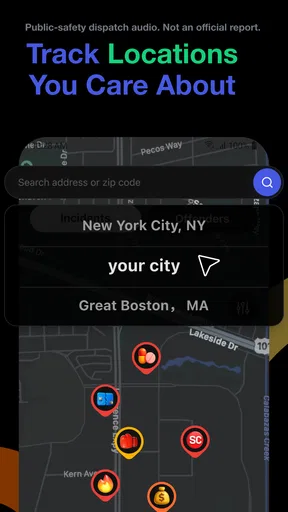
If you prefer not to share your location, the original experience describes location as optional and says you can explore other areas without it. That can be useful when planning a visit from home or checking a destination before traveling. I’d still take a moment to orient the map carefully: looking at the wrong area or reading a marker without context can create confusion rather than useful awareness. A quick check of the place name and surrounding streets is a small step that can prevent a bad assumption.
When deciding whether to keep alerts on, I’d start with the smallest set that supports a clear purpose. For example, someone who only wants to prepare for a regular commute may not need constant attention to every nearby event. A traveler checking a destination once may prefer a manual look instead. The right choice depends less on how much information an app can surface and more on whether that information changes a reasonable action.
Getting Started: First Impressions
When you first fire up CrimeRadar, you're greeted with a clean and straightforward interface. It's easy on the eyes and doesn’t overwhelm you with too much information at once. The app quickly asks for your location, which makes sense since it needs to tailor the crime data to where you are. If you're concerned about privacy, fret not—it's entirely optional, and you can still explore other areas without sharing your location.
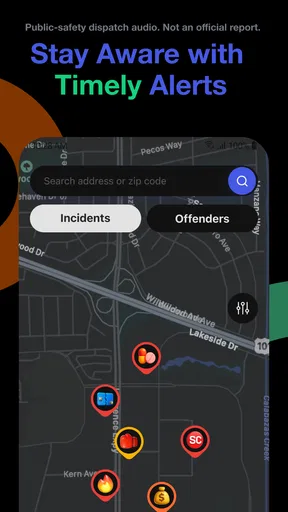
Once you're set up, you get a neat map view with little icons that represent different types of crimes. Talk about feeling like a detective without the trench coat!
Features That Stand Out
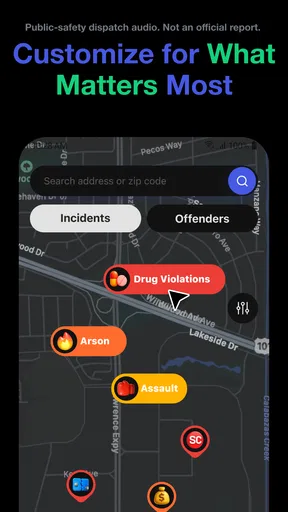
One thing I really appreciated is the variety of filters available. You can customize the map to show specific types of crimes, like thefts, assaults, or vandalism. This makes it super handy if you're only interested in certain types of incidents.
Another nifty feature is the alert system. You can set up notifications for when new crimes are reported in your area. It’s like having a personal crime watch assistant. Perfect for those who want to stay informed without constantly checking the app.
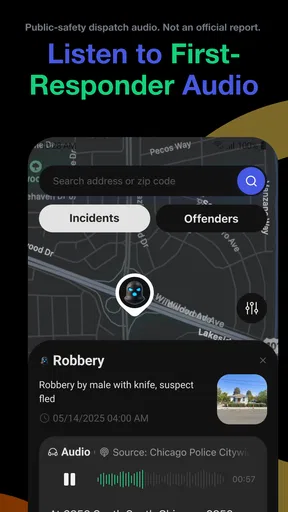
Oh, and let’s not forget the detailed reports. Clicking on an icon gives you more information, like the time and date of the incident, which can be crucial for those who are extra cautious about their safety routines.
My Personal Take
CrimeRadar is more than just an app; it’s a tool for awareness. In today's world, being informed is being prepared. I found the app to be both educational and practical. Sure, it might make you a bit paranoid at first, but knowledge is power, right?
The user experience is smooth, and I didn’t encounter any bugs or crashes during my testing. The only downside? It can be a little alarming to see just how much crime happens around us, but that’s not the app’s fault!
Wrapping Up: Is It Worth It?
So, would I recommend CrimeRadar? Absolutely. Whether you’re a concerned parent, a traveler, or just someone who loves data, this app provides insights that are hard to find elsewhere. It’s a free download, so why not give it a shot and see how it fits into your life?
In a nutshell, if staying informed about your surroundings is important to you, then this app is definitely worth having on your phone. You never know when a little extra information could make all the difference.
Making the information useful without letting it take over
My main advice is to decide what question you want the map to answer before you open it. “Is there anything nearby I should know about before I leave?” is manageable. “Can this tell me whether my whole area is safe?” is not. A focused question keeps the experience grounded and makes the filters more useful: narrowing the map to the kinds of incidents relevant to your concern can be more informative than scanning every symbol at once.
I’d also look at an incident’s details before reacting to its map position. The time and date help me distinguish a recent event from something that is only part of the area’s history, while the category gives a little more context than an icon alone. Neither detail tells the whole story, but together they can stop a marker from becoming an exaggerated impression. If I’m planning a route, I’d check the streets I’ll actually use instead of drawing conclusions from the wider neighborhood.
One less obvious trade-off is that filters make a map easier to read but also make it easier to see only the information I expect. If I’m concerned about a particular type of incident, narrowing the display can help me focus; it can also leave out other context. I’d use filters to answer a specific question, then briefly return to the broader view before deciding. That small second look can keep a customized screen from becoming a misleadingly complete picture.
Where the workflow can break down
The handoff from a notification to a decision is not always straightforward. An alert can arrive when I’m busy, far from the location, or unable to tell whether it changes anything about my plans. In that situation, I would not assume I need to act immediately. I’d check the location and incident details when practical, then decide whether the information is relevant. If it is not, dismissing it and carrying on is a sensible outcome—not a failure to use the app.
Likewise, an alert should not become a substitute for directions. If I need to know which route is fastest, whether transit is delayed, or what a road is like right now, a navigation or transport app is the more suitable tool. CrimeRadar’s purpose is different: it can add an incident-awareness layer to a decision, but it should not be expected to calculate a safer route or guarantee that a chosen path avoids risk.
There is also a personal comfort question. Some people feel calmer when they can check local information; others become more worried as they see more reports. I’d give the app a fair trial during a defined routine—perhaps checking before a commute—rather than leaving it open as a constant stream of potential trouble. If it makes ordinary errands feel threatening, stepping back is more useful than collecting still more alerts.
Who will get the most from it
I see the strongest case for CrimeRadar among people who make repeated decisions about where and when to go: someone with a changing commute, a person settling into a new neighborhood, or a visitor who wants to inspect an unfamiliar destination before heading out. The map and incident details can support a more informed conversation or a modest adjustment to a plan. They are less valuable to someone who never changes their routine based on local context, or who expects a safety app to make the decision for them.
For a household, I’d use it as one small part of a broader plan rather than as a monitoring tool for other people. A parent and older child might discuss what to do if a route feels uncomfortable, when to contact someone, and which official channels to use in an emergency. The app can give that discussion a concrete local prompt, but it cannot replace trust, communication, or clear arrangements.
For people who follow news mainly to understand causes, outcomes, and community issues, a traditional news source will usually offer more reporting and context. For someone looking for a quick spatial view of reported incidents, this app is more directly suited to the task. That difference is the clearest way I’d choose between it and familiar alternatives: use a news app for the story, navigation for the journey, and CrimeRadar for an additional local-awareness check.
My final recommendation
I’d recommend giving the app a try if you have a specific reason to check local incident information and can treat it as one source rather than a promise of safety. Its map, filters, alerts, and incident details give the experience a practical shape, while the connection to live first-responder radio makes calm interpretation especially important. The strongest use is a brief check that informs a real decision; the weakest is endless browsing that produces worry without a next step.
Ultimately, the useful result is not knowing every detail about every event. It is deciding whether a particular piece of information changes what you will do, then moving on with a sensible plan. If that kind of context would help you feel prepared, CrimeRadar is worth considering. If you want comprehensive journalism, turn to a news source; if you need emergency help, contact the appropriate services. Used within those limits, it can be a helpful companion for awareness without pretending to be the final authority on safety.
Pros
- Real-time crime updates enhance awareness.
- User-friendly interface for easy navigation.
- Customizable alerts for specific areas.
- Detailed crime statistics and trends.
- Interactive map for visual crime tracking.
Cons
- Limited to certain geographic regions.
- Requires internet connection for updates.
- Some data may be outdated or incomplete.
- Notifications can become overwhelming.
- No offline mode for travel use.
FAQs for CrimeRadar: Dispatch Alerts
What is CrimeRadar and how does it work?
CrimeRadar is a mobile application designed to provide users with real-time crime data and alerts for their specific location. It utilizes GPS technology to track the user's location and deliver timely information about nearby criminal activities. The app gathers data from official sources and local reports, ensuring users are informed about their surroundings.
Is CrimeRadar available on both Android and iOS platforms?
Yes, CrimeRadar is available for download on both Android and iOS platforms. Users can find the app on the Google Play Store for Android devices and the Apple App Store for iOS devices. It offers a user-friendly interface compatible with most smartphones.
How accurate is the crime data provided by CrimeRadar?
CrimeRadar strives to offer accurate and up-to-date crime data by sourcing information from official databases and verified local reports. However, users should be aware that data accuracy can vary based on geographic location and reporting frequency. It's always advisable to cross-check with local law enforcement for critical situations.
Are there any privacy concerns when using CrimeRadar?
CrimeRadar respects user privacy and only uses location data to provide relevant crime alerts. The app does not store personal information or track users beyond what is necessary to deliver its services. Users can also adjust privacy settings to control data sharing preferences within the app.
Does CrimeRadar offer any additional features beyond crime alerts?
Yes, CrimeRadar includes several additional features such as customizable alert settings, a heat map of crime trends, and a community forum for users to share information and safety tips. These features are designed to enhance user awareness and promote community engagement in safety efforts.


